

All about AFAS
AFAS: Get products from AFAS
Get articles from AFAS with title, description, price, images, categories and variants, and send them to your webshop or marketplace.
Updated November 9, 2026
This flow gets articles from AFAS and sends them as products to another application, such as a webshop or marketplace. Use it when AFAS is the leading system for your products.
How it works
- Many standard fields are linked, such as title, description, price, images, SKU (article number), categories and tax rate. See Data mapping of this flow for the exact fields.
- APIcenter gets the articles that changed since the last run, based on the modification date of the article. You choose the date from which APIcenter starts, and you can always set it back to send products again.
- The price comes from the base price list you set in the settings below.
- A stock change does not count as an article change. For stock, use Get stock from AFAS. For price lists and discount groups, use Get price lists from AFAS.
Adjust the connectors first
The product data comes from several GetConnectors in the connector set, such as ApiCenter_Article, ApiCenter_Image and ApiCenter_Categories_AG. Some fields in these connectors are placeholder free fields. Replace them with your own free fields, or remove them:
- AFAS has two content fields (description and extra description), while most webshops use three. Choose which AFAS field is used for which content field.
- Product visibility, SEO information and store views use free fields. Fill them in if you use them, otherwise remove them.
- A hard filter in the connector, for example a free field that marks webshop products, keeps other articles out. This is better than filtering afterwards in APIcenter, which still costs API calls.
- You can deliver up to seven images per article. Only add the free fields for images that you really use.
Variants, such as sizes and colours
Do you sell products in variants, such as clothing in sizes and colours? Set this up in AFAS:
- In Profit, go to Algemeen (General) > Beheer (Management) and open the function group Item.
- Add at least three free fields: a Yes/No field that marks an article as configurable, a field linked to the fixed table Articles (Artikelen) that points to the main article, and at least one attribute that varies, such as colour or size.
- Create a container article (the display product) and tick the configurable box. It has no stock, but it must exist for the integration.
- For each physical variant, refer to the container in the main article field (Hoofdartikel) and fill in the attribute, such as the colour.
Features that are the same for all variants, such as the material or the country of manufacture, are only filled in on the main product.
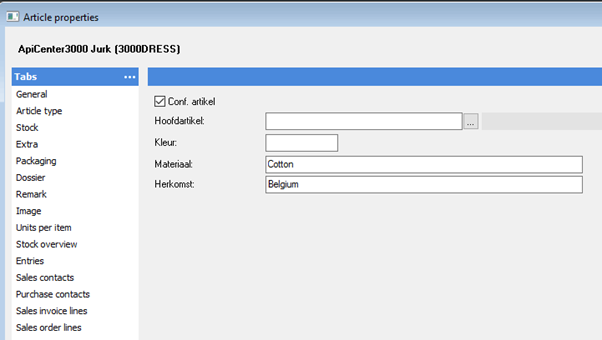
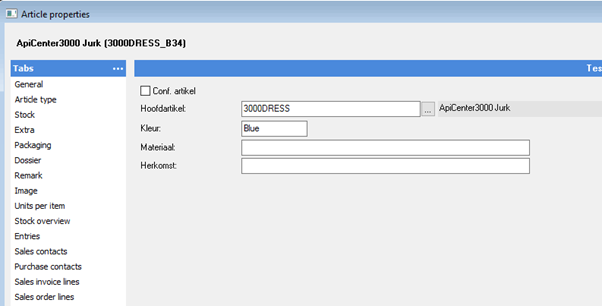
Then, in the settings below, map which AFAS attribute belongs to which attribute in the other application. Only map attributes that make a variant unique, such as size and colour, not features. Then define the features of the product.
Multi-level categories
APIcenter supports categories with several levels. Add two free fields to the article group (artikelgroep) in AFAS:
- A field for the level: a whole number, where 0 is the main category, 1 a subcategory and 2 a sub-subcategory.
- A field linked to an existing article group, for the parent category.
On the article, choose the lowest category the product belongs to. The parent categories are included automatically.
What you need first
- The connector set is imported and adjusted, and the GetConnectors are added to the App connector. See Connect AFAS to APIcenter.
Tips
- Is an article not sent? Check the hard filter in the connector and the date set for this flow.
- A configurable product without attributes is not possible. Fill in at least one attribute on each variant.
You find all settings for this flow below, each with its own explanation.
Settings
The settings you see in the dashboard, with what each one does.
Default category name
CategoriesThe name of the category APIcenter uses as default. When sending products to AFAS this is the article group (artikelgroep) a product is created in; every new article needs an article group, so use the name of an existing article group in AFAS. When retrieving products from AFAS it is the category given to products without one. Default: Import API Center.
When on, APIcenter always uses the default category, even if the product already has one. When retrieving products from AFAS, every product then gets the default category instead of its own article group (artikelgroep). When sending products to AFAS, every product is created in the default article group. When off (default), the default is only used when a product has no category.
Turn this on to use a default category when a product or variant has no category. When sending products to AFAS, the default is used as the article group (artikelgroep) of new articles. You enter the name in Set the value for the default article group, and with the force setting you can apply it to all products. Off by default.
Force category on variant as parent
CategoriesMeant to always give a variant the category of its parent product, even when the variant has a category of its own. The AFAS flows do not use this setting at the moment, so changing it has no effect. Leave it at the default (off).
Set category on variant as parent
CategoriesMeant to give a variant the category of its parent product when the variant has no category of its own. The AFAS flows do not use this setting at the moment, so changing it has no effect. Leave it at the default (off).
Enable URL Encoding of data in the endpoints of the source application
General flow settingEnable URL Encoding of data in the endpoints of the target application
General flow settingEnable URL encoding of data in endpoints
General flow settingExpect multiple categories on products
General flow settingTurn this on when an article in AFAS can belong to more than one category. APIcenter then reads every category field that the AFAS product GetConnector provides, instead of only the main category field. When off (default), each product gets only its main category.
Use administration mapping table
General flow settingWhat to do with a value that cannot be mapped using the mapping table
General flow settingNotifications Email address
NotificationsNotifications Slack webhook
NotificationsNotifications frequency
NotificationsReceive Notifications
NotificationsWhat price list do you want to use as your base price list?
PriceList SettingsThe AFAS price list (prijslijst) APIcenter uses as the base price list when it retrieves products and price lists from AFAS. The default ***** (five asterisks) is the standard AFAS price list excluding VAT. Only change it when you use another price list in AFAS as your base price.
Fetch only simple products
Product SettingsWhen on, APIcenter retrieves every AFAS article as a separate, simple product and does not combine variants with their main article. Use this when you do not work with configurable products in AFAS, or when the other application should receive each article on its own. When off (default), an article that refers to another article in the Hoofdartikel (main item) field is sent as a variant of that main article.
Amount to process
Run behaviourLast execution time
Run behaviourMaximum number of pages to retrieve
Run behaviourOffset
Run behaviourRun at specific times
Run behaviourThe date and time from which the flow retrieves records from AFAS, based on their modification date: for example articles, debtors, price lists, stock, payments or shipments that changed after this moment. APIcenter moves this date forward automatically after each run, so the next run continues where the last one stopped. Set it back in time to send records again, for example all stock after a stock count, because AFAS does not register a stock correction as a change. For AFAS the default is 1 January 2025.