

All about AFAS
AFAS: Send customers to AFAS
Send customers from your webshop or CRM to AFAS. APIcenter creates new debtors and contacts, or updates existing ones.
Updated November 9, 2026
This flow sends customers from another application, such as a webshop or CRM, to AFAS. APIcenter creates them as debtors (verkooprelaties) in AFAS, or updates them when they already exist.
How it works
- By default, APIcenter sends the contact and company details, the VAT number and the e-mail address. You can add more fields under Data mapping.
- APIcenter looks for the customer in AFAS by debtor number. If there is no debtor number, or it is not found, APIcenter looks by e-mail address.
- Is the customer not found? Then APIcenter creates it. A customer with a company name becomes an organisation (verkooprelatie organisatie), otherwise a person (verkooprelatie persoon).
- Is the customer found? Then APIcenter updates it, but only when updating existing customers and contacts is switched on in the connection and integration settings. For existing customers, APIcenter does not change the communication method, customer type, revenue account, debtor ledger account and VAT code.
- With the settings below, you can also choose to create only contacts or only the main account.
What you need first
AFAS needs a few values that most source systems do not have. Set them in the settings below:
- Communication method (voorkeur verstrekkingswijze):
Uis available by default in AFAS. - Payment terms:
14stands for 14 days and is available in most AFAS environments. This is set on the customer and is separate from the order. - Debtor ledger account (verzamelrekening): the collective account to which new debtors are assigned. In AFAS, look in your general ledger accounts (grootboekrekeningen) for the debtors account marked as Verzamelrekening.
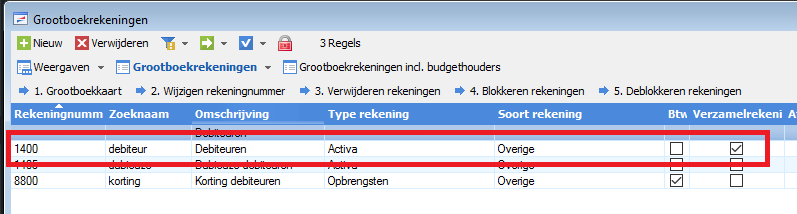
When you do not use a mapping table, force these values so every customer gets them.
In the App connector, the UpdateConnectors Contact, Organisatie, Persoon, Verkooprelatie organisatie and Verkooprelatie persoon must be added. See Connect AFAS to APIcenter.
Tips
- Do you want to handle several contact persons per customer? That only works when the person GetConnector from the APIcenter connector set is added in AFAS.
- Is an existing customer not updated? Check the update settings in the connection and integration settings.
You find all settings for this flow below, each with its own explanation.
Settings
The settings you see in the dashboard, with what each one does.
Add contact to person
Customer SettingsWhen APIcenter creates or updates a private customer (a person, not an organisation) in AFAS, this setting also adds a contact (contactpersoon) to that person with the same address, email address and phone number. For organisations a contact is always added. This only has effect when contact persons are used (setting Use contact persons). Off by default.
Default customer profile id
Customer SettingsThe customer profile APIcenter uses when customer data contains none. The standard data mapping to AFAS does not use the customer profile, so the value only reaches AFAS when you use this field in the data mapping of the flow.
Default customer type id
Customer SettingsDefault price list group
Customer SettingsThe AFAS price list (prijslijst) APIcenter uses as default. When sending orders to AFAS, APIcenter puts this price list on the order lines when the default price list group is enabled. When retrieving price lists from AFAS, this price list provides the base price from which the other prices are calculated. Default: *****, the standard AFAS price list excluding VAT.
Enable use of a default customer group
Customer SettingsEnable use of a default customer price list group
Customer SettingsTurn this on to use a default price list group. For orders sent to AFAS, the order lines then get the default price list. For Business Pricing (retrieving price lists from AFAS) you also turn this on, because APIcenter needs a base price to calculate discounts, percentages and other prices. Off by default.
Enable use of a default customer profile id
Customer SettingsForce the preferred way of communication
Customer SettingsWhen on, APIcenter always uses the default preferred way of communication (voorkeur verstrekkingswijze) for debtors it creates in AFAS, even if the data contains another value. When off, the default is only used when the data has no value. For AFAS this setting is on by default.
Force the usage of the customer profile id
Customer SettingsForce the usage of the customer type id
Customer SettingsWhen on, APIcenter always uses the default customer type for relations it creates in AFAS, even if the data contains another type. When off, the default is only used when the data contains no customer type. For AFAS this setting is on by default.
Force the usage of the default customer group
Customer SettingsForce the usage of the default payment terms
Customer SettingsWhen on, APIcenter always uses the default payment condition (betalingsvoorwaarde) for debtors in AFAS, even if the data contains another value. When off (default), the default is only used when the data has no value. If you do not use a mapping table for payment conditions, we recommend turning this on.
Force the usage of the default price list group
Customer SettingsForce the usage of the payment_method id
Customer SettingsHandle multiple contactpersons
Customer SettingsTurn this on when a customer can have several contact persons (contactpersonen) and all of them must be created or updated in AFAS, instead of only one. This only works when the person GetConnector made by APIcenter is added to your AFAS environment; the APIcenter guide explains how to install it. Contact persons are only sent when Use contact persons is on as well. Off by default.
Make use of a default customer type id
Customer SettingsMake use of a default payment method id
Customer SettingsPreferred way of communication
Customer SettingsThe preferred way of communication (voorkeur verstrekkingswijze) APIcenter sets on debtors it creates in AFAS. The usual value is U, which is present in AFAS by default and stands for sending invoices by email. Existing debtors keep the value they have in AFAS. Default for AFAS: U.
Preferred way of communication mapping table
Customer SettingsUse a mapping table to translate a value from the other application into the preferred way of communication (voorkeur verstrekkingswijze) of the debtor in AFAS, for example U for invoice by email with PDF. APIcenter only sets this when it creates a new debtor; for existing debtors in AFAS the value is not changed. Make sure the table covers every value that can occur in the incoming data. Off by default.
Provision method
Customer SettingsAdds one or more provisions (verstrekkingen) with their provision method (verstrekkingswijze) to the debtor in AFAS, after APIcenter has created or updated the debtor. Enter each pair as the provision code and the method separated by a comma, and separate several pairs with a vertical bar: type,method|type,method. Use the codes from your own AFAS environment. If AFAS rejects a pair, the customer or order is still processed. Leave empty if you do not need this.
Set new customers to be opted-in, so email messages will be sent
Customer SettingsMeant to mark new customers as opted in, so the receiving application may send them email messages. AFAS does not use this setting when it receives customers or orders, so changing it has no effect for AFAS. Leave it at the default (off).
Set the payment term on customer level
Customer SettingsTurn this on to set a payment condition (betalingsvoorwaarde) at customer level on debtors in AFAS. AFAS needs a payment condition on a debtor, and 14 (14 days) is always present in AFAS. For AFAS this setting is on by default.
Use a mapping table to map the default payment method id
Customer SettingsUse contact persons
Customer SettingsDetermines whether contact person details are sent to AFAS when APIcenter creates or updates a debtor. When on, the contact person (contactpersoon) from the incoming data is created or updated together with the organisation. When off, only the organisation or person itself is created or updated, without a contact person. Off by default.
Use customer group mapping table
Customer SettingsUse a mapping table to translate the customer group from the other application into the value the receiving side expects. Without a mapping table, the customer group from the incoming data is passed on unchanged. The standard AFAS data mapping for sending does not fill a customer group, so this only has an effect when you use the customer group in the data mapping. Off by default.
Use default customer profile id mapping table
Customer SettingsUse a mapping table to translate the customer profile from the other application into the value AFAS should receive. The standard AFAS data mapping for customers does not fill a customer profile, so this only has an effect when you use the customer profile in the data mapping. Make sure the table covers every value that can occur in the incoming data. Off by default.
Use default customer type id mapping table
Customer SettingsUse a mapping table to translate the customer type from the other application into the customer type code in AFAS. APIcenter only sets the customer type when it creates a new debtor; for existing debtors in AFAS it is not changed. Make sure the table covers every value that can occur in the incoming data. For AFAS this is on by default.
Use default payment terms id mapping table
Customer SettingsUse a mapping table to translate payment terms from the other application into the payment condition (betalingsvoorwaarde) of the debtor in AFAS, for example 14 for 14 days, which most AFAS environments have. The payment condition is set at debtor level, separate from the order. Values that are not in the table are handled by What to do with a value that cannot be mapped using the mapping table. Off by default.
Use default price list group mapping table
Customer SettingsValue for the default payment method id
Customer SettingsThe payment method APIcenter uses when the data contains none. For sales orders this value is sent to AFAS as the payment method of the order. Use the code of a payment method that exists in AFAS; with a mapping table you can translate the payment methods of your webshop into AFAS codes.
Value to use as default customer group
Customer SettingsThe customer group APIcenter uses when the data contains none. With a customer group mapping table you can translate the groups from the source into the values you need. The value only reaches AFAS when the customer group is used in the data mapping of the flow.
What to do with a value that cannot be mapped using the mapping table
Customer SettingsWhat to do with a value that cannot be mapped using the mapping table
Customer SettingsWhat to do with a value that cannot be mapped using the mapping table
Customer Settingsdefault payment terms id
Customer SettingsThe payment condition (betalingsvoorwaarde) APIcenter sets on the debtor in AFAS. It applies at customer level and is separate from the order. 14 stands for the standard 14 days, which is present in most AFAS environments. To find another code, open any sales order in AFAS and select the payment condition you want: the code appears on the order. Default for AFAS: 14.
Enable URL Encoding of data in the endpoints of the source application
General flow settingEnable URL Encoding of data in the endpoints of the target application
General flow settingEnable URL encoding of data in endpoints
General flow settingUse administration mapping table
General flow settingWhat to do with a value that cannot be mapped using the mapping table
General flow settingDebtor ledger account
Ledger SettingsThe debtor ledger account (verzamelrekening) that new debtors are linked to in AFAS. AFAS requires this account for every new debtor. You find it in AFAS under your ledger accounts (grootboekrekeningen): use the number of the debtors account marked as Verzamelrekening. Existing debtors keep their own account. Default for AFAS: 1400.
Default customer sales vat code id
Ledger SettingsEnable the use of a default customer sales vat code id
Ledger SettingsForce the usage of the customer sales vat code id
Ledger SettingsForce the usage of the debtor ledger account
Ledger SettingsWhen on, APIcenter always uses the default debtor ledger account (verzamelrekening) for debtors it creates in AFAS, even if the data contains another account. When off (default), the default is only used when the data has no value. For AFAS we recommend turning this on.
Ledger account mapping table
Ledger SettingsUse a mapping table to translate a value from the other application into the debtor ledger account (verzamelrekening) in AFAS. APIcenter only sets this ledger account when it creates a new debtor; existing debtors keep their own. Without a mapping table, the value from the incoming data is used, or the default Debtor ledger account when the data has no value. Off by default.
Make use of the debtor ledger account (Verzamelrekening)
Ledger SettingsTurn this on to set a debtor ledger account (verzamelrekening) on debtors that APIcenter creates in AFAS. AFAS requires this account for new debtors, so turn this on when APIcenter creates customers in AFAS. Off by default.
Use default customer sales vat code id mapping table
Ledger SettingsUse a mapping table to translate a value from the other application into the VAT duty (btw-plicht) of the debtor in AFAS. APIcenter only sets this when it creates a new debtor; for existing debtors in AFAS the value is not changed. Values that are not in the table are handled by What to do with a value that cannot be mapped using the mapping table. Off by default.
Decides what happens when the payment journal (dagboek) mapping table has no row for a value: Use default (default) uses the default journal if that default is switched on, Use value sends the original value unchanged and Ignore value leaves the field empty. The standard AFAS data mapping for customers does not send a journal, so this setting normally has no effect in the Send Customer flow.
Notifications Email address
NotificationsNotifications Slack webhook
NotificationsNotifications frequency
NotificationsReceive Notifications
NotificationsMaximum number of pages to retrieve
Run behaviourUse page size
Run behaviourEnable the use of a default tax id
Tax & Tax RatesTurn this on to use a default tax class (VAT code) when the data contains none. You enter the value in Set the value for the default taxclass when products are created. This default is also used for the extra order lines for costs when they have no tax class of their own. Off by default.
Force the use of the default tax id
Tax & Tax RatesWhen on, APIcenter always uses the default tax class (VAT code), even if the data contains another one. When off (default), the default is only used when the data contains no tax class. For products sent to AFAS, this means every new product gets the default tax class.
Use default tax id mapping table
Tax & Tax RatesUse a mapping table to translate VAT classes or rates from the other application into VAT codes (btw-codes) in AFAS, for example the 21% rate of a webshop into the matching AFAS code. On orders, refunds and purchase orders the code is set per order line; for financial mutations it is also used as the VAT code of the booking. Values that are not in the table are handled by What to do when the mapping can not be made?. Off by default.
Value for the default tax id (exclude '%')
Tax & Tax RatesThe tax class (VAT code) APIcenter uses when the data contains none. Enter the value without a % sign. With a mapping table you can translate the tax values of the source into the VAT codes of AFAS. For products, the tax class is only set when the product is created in AFAS; you change it later in AFAS itself.
Decides what happens when the VAT mapping table has no row for a value from the incoming data.
- Use default: APIcenter uses the default tax id, if that default is switched on; otherwise the field stays empty.
- Use value: the original value is sent to AFAS unchanged.
- Ignore value (the AFAS default): the field stays empty.
For products, AFAS always expects a VAT value, so choose Use default there and set a default tax id.