

All about AFAS
AFAS: Send refunds to AFAS
Send credit notes and returns from other systems to AFAS, as a direct invoice with a stock mutation or as a financial mutation.
Updated November 9, 2026
This flow creates credit notes and returns from other applications in AFAS, for example refunds from your webshop.
How it works
- APIcenter looks for the customer in AFAS by debtor number or e-mail address. If the customer does not exist, the flow stops: this flow does not create customers.
- With the Send Refund as setting, you choose how the credit is booked:
- Direct Invoice: a direct credit note. Just like a direct invoice, it creates a booking with a matching stock mutation. The quantities are booked as negative.
- Financial Mutation: a journal entry on the general ledger, with debit and credit reversed compared to a sale.
What you need first
- The customer exists in AFAS, for example because the original order was sent with Send sales orders to AFAS.
- Always set the administration in which the credit is booked, with the default administration setting.
- A warehouse must be known for each credit note, and a unit for each line.
- For a financial mutation: set the journal (dagboek), the ledger accounts (grootboekrekeningen), for example for revenue, tax, shipping and discount, and the financial mutation method. The methods are explained in Send sales orders to AFAS.
Tips
- Does the flow stop because the customer was not found? Check that the debtor number or e-mail address in the refund matches the customer in AFAS.
- Use the same booking method as for your sales orders, so sales and credits end up in the same place in your administration.
You find all settings for this flow below, each with its own explanation.
Settings
The settings you see in the dashboard, with what each one does.
Stop flow when mapping of fields fails
Datamapper SettingsForce the use of the default ledger discount account
Financial Mutation SettingsForce the use of the default ledger revenue account
Financial Mutation SettingsForce the use of the default ledger shipping account
Financial Mutation SettingsForce the use of the default ledger tax account
Financial Mutation SettingsMake use of a default ledger discount account
Financial Mutation SettingsTurn this on to use a default ledger account for discounts in financial mutations. You need it when you send orders or refunds to AFAS as a financial mutation with the type Extreme. Off by default.
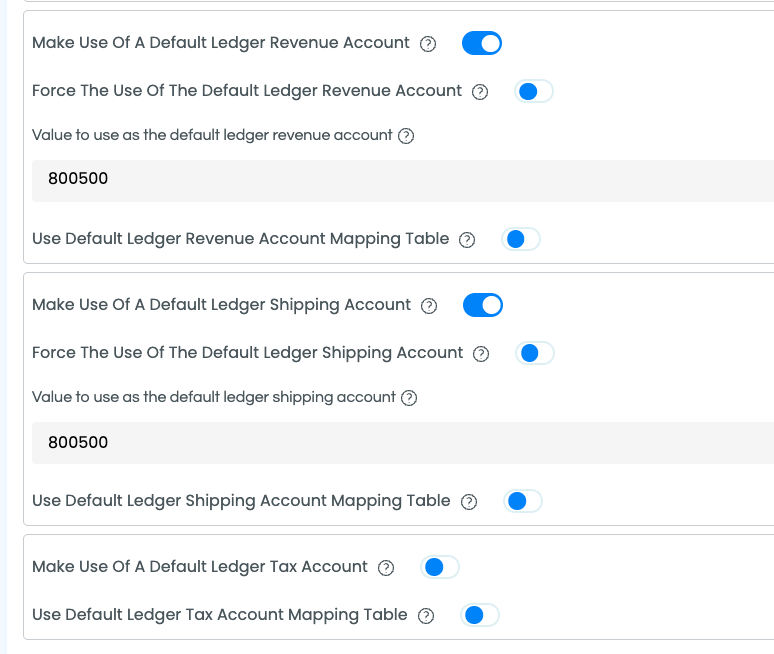
Make use of a default ledger revenue account
Financial Mutation SettingsTurn this on to use a default ledger account for revenue in financial mutations. You need it when you send orders or refunds to AFAS as a financial mutation and the data contains no revenue account. Off by default.
Make use of a default ledger shipping account
Financial Mutation SettingsTurn this on to use a default ledger account for shipping costs in financial mutations. You need it when you send orders or refunds to AFAS as a financial mutation with the type Complex or Extreme. Off by default.
Make use of a default ledger tax account
Financial Mutation SettingsTurn this on to use a default ledger account for VAT in financial mutations. You need it when you send orders or refunds to AFAS as a financial mutation with the type Recommended, Complex or Extreme. Off by default.
Use default ledger account debtor mapping table
Financial Mutation SettingsMeant for accounting packages that book refunds on a fixed debtor ledger account. The AFAS refund flow does not use this setting, so changing it has no effect for AFAS. For refunds booked as a financial mutation, use the ledger account settings for revenue, VAT, shipping costs and discounts instead. Leave it at the default (off).
Use default ledger account revenue mapping table
Financial Mutation SettingsMeant for accounting packages that book refunds on a fixed revenue ledger account. The AFAS refund flow does not use this setting, so changing it has no effect for AFAS. For refunds booked as a financial mutation, use Use default ledger revenue account mapping table instead. Leave it at the default (off).
Use default ledger discount account mapping table
Financial Mutation SettingsUse a mapping table to choose the ledger account (grootboekrekening) for discounts when an order or refund is booked as a Financial Mutation. Each row links a value from the incoming data to an AFAS ledger account number. A separate discount line is only made with the Extreme financial mutation method. Off by default.
Use default ledger revenue account mapping table
Financial Mutation SettingsUse a mapping table to choose the revenue ledger account (omzetrekening) when an order or refund is booked as a Financial Mutation. Each row links a value from the incoming data to an AFAS ledger account number. A revenue account is needed with every financial mutation method. Off by default.
Use default ledger shipping account mapping table
Financial Mutation SettingsUse a mapping table to choose the ledger account (grootboekrekening) for shipping costs when an order or refund is booked as a Financial Mutation. Each row links a value from the incoming data to an AFAS ledger account number. Shipping costs get their own line only with the Complex and Extreme financial mutation methods. Off by default.
Use default ledger tax account mapping table
Financial Mutation SettingsUse a mapping table to choose the VAT ledger account (btw-rekening) when an order or refund is booked as a Financial Mutation. Each row links a value from the incoming data to an AFAS ledger account number. VAT gets its own line with the Recommended, Complex and Extreme financial mutation methods. Off by default.
Use financial mutation method
Financial Mutation SettingsDetermines how an order or refund is split into lines when it is booked in AFAS as a Financial Mutation (financiële mutatie). The other side of the booking always goes to the debtor.
- Simple (default): the whole order on one revenue line.
- Recommended: revenue and VAT on separate lines.
- Complex: a line per order line, each with its own revenue account from the order data or business rules, plus separate lines for VAT and shipping costs.
- Extreme: like Complex, plus a separate line for discounts. Only use this together with an implementation partner.
Value to use as the default ledger discount account
Financial Mutation SettingsThe ledger account (grootboekrekening) for discounts when APIcenter sends an order or refund to AFAS as a financial mutation. It is used with the financial mutation type Extreme, which books discounts on a separate line. Replace the prefilled value with an account number from your own chart of accounts in AFAS. Prefilled value: 8100.
Value to use as the default ledger revenue account
Financial Mutation SettingsThe ledger account (grootboekrekening) for revenue when APIcenter sends an order or refund to AFAS as a financial mutation. A revenue account is required for every financial mutation type (Simple, Recommended, Complex and Extreme). Replace the prefilled value with an account number from your own chart of accounts in AFAS. Prefilled value: 8100.
Value to use as the default ledger shipping account
Financial Mutation SettingsThe ledger account (grootboekrekening) for shipping costs when APIcenter sends an order or refund to AFAS as a financial mutation. It is used with the types Complex and Extreme: the order line for shipping costs (see Require order line for shipping costs) is booked on this account. Replace the prefilled value with an account number from your own chart of accounts in AFAS. Prefilled value: 1600.
Value to use as the default ledger tax account
Financial Mutation SettingsThe ledger account (grootboekrekening) for VAT when APIcenter sends an order or refund to AFAS as a financial mutation. A tax account is required for the types Recommended, Complex and Extreme, which book the VAT on a separate line. Replace the prefilled value with an account number from your own chart of accounts in AFAS. Prefilled value: 1600.
What to do with a value that cannot be mapped using the mapping table
Financial Mutation SettingsWhat to do with a value that cannot be mapped using the mapping table
Financial Mutation SettingsWhat to do with a value that cannot be mapped using the mapping table
Financial Mutation SettingsWhat to do with a value that cannot be mapped using the mapping table
Financial Mutation SettingsWhat to do with a value that cannot be mapped using the mapping table
Financial Mutation SettingsDecides what happens when the debtor ledger account mapping table for refunds has no row for a value: Use default (default) uses the default value, Use value keeps the original value and Ignore value leaves the field empty. The AFAS refund flow does not use this mapping, so this setting has no effect for AFAS.
What to do with a value that cannot be mapped using the mapping table
Financial Mutation SettingsDecides what happens when the revenue ledger account mapping table for refunds has no row for a value: Use default (default) uses the default value, Use value keeps the original value and Ignore value leaves the field empty. The AFAS refund flow does not use this mapping, so this setting has no effect for AFAS.
Enable URL Encoding of data in the endpoints of the target application
General flow settingEnable URL encoding of data in endpoints
General flow settingForce the usage of a single administration set by the default
General flow settingSet the administration
General flow settingSet the administration ID that we use for sending the refunds/creditnotes towards
General flow settingThe code of the AFAS administration (administratie) APIcenter sends orders, purchase orders and refunds to. Enter the code of the administration, not its name; you can use any administration in your AFAS environment. For refunds an administration is always required. In a multi-store setup you can use a mapping table to send each store to its own administration. Default for AFAS: 01.
Use administration mapping table
General flow settingWhat to do with a value that cannot be mapped using the mapping table
General flow settingEnable use of a default journal
Ledger SettingsTurn this on to use a default journal (dagboek) when the data contains none. You need a journal when you send orders or refunds to AFAS as a financial mutation. You enter the code in Value to be used as the default journal id.
Force the use of the default journal Id
Ledger SettingsValue to be used as the default journal id
Ledger SettingsThe code of the journal (dagboek) in AFAS on which APIcenter books financial mutations for orders and refunds. Use a journal code that exists in your AFAS administration. If no journal is filled in, APIcenter uses journal 40.
Notifications Email address
NotificationsNotifications Slack webhook
NotificationsNotifications frequency
NotificationsReceive Notifications
NotificationsSend Refund as
Order SettingsDetermines what APIcenter creates in AFAS for each incoming order.
- Order (default): a sales order (verkooporder). The articles must exist in AFAS and stock is updated.
- Direct Invoice: a direct invoice (directe factuur), including a stock mutation.
- Quotation: a quotation (offerte), without a stock mutation.
- Financial Mutation: a booking in the general ledger, split according to Use financial mutation method. The articles do not need to exist in AFAS.
- Forecast: a forecast of the expected revenue.
The other options are not supported for AFAS sales orders. For refunds, choose Financial Mutation for a booking in the general ledger; any other choice creates a direct invoice as credit (the AFAS default for refunds). Purchase orders are always created as purchase orders.
Maximum number of pages to retrieve
Run behaviourUse page size
Run behaviourEnable the use of a default shipping method
Shipment SettingsForce the use of the default shipping method
Shipment SettingsUse a mapping table to map shipping methods
Shipment SettingsUse a mapping table to translate the shipping method from the other application into the value AFAS should receive. The standard AFAS data mapping does not send a shipping method, so this only has an effect when you use the shipping method in the data mapping. Values that are not in the table are handled by What to do with a value that cannot be mapped using the mapping table. Off by default.
Value to use as the default shipping method id
Shipment SettingsThe shipping method APIcenter uses when the data from the source contains none. The standard data mapping to AFAS does not send the shipping method itself, so this only has effect when you use it in the data mapping or in business rules.
What to do with a value that cannot be mapped using the mapping table
Shipment SettingsEnable the use of a default warehouse
Stock & Warehouse SettingsTurn this on to use a default warehouse (magazijn). For orders sent to AFAS, APIcenter then puts this warehouse on the order and on order lines without a warehouse. If this is on but no warehouse code is filled in, the order is not sent. Off by default.
Force the usage of the default warehouse
Stock & Warehouse SettingsUse warehouse mapping table
Stock & Warehouse SettingsValue for the default warehouse id
Stock & Warehouse SettingsWhat to do with a value that cannot be mapped using the mapping table
Stock & Warehouse SettingsEnable the use of a default tax id
Tax & Tax RatesTurn this on to use a default tax class (VAT code) when the data contains none. You enter the value in Set the value for the default taxclass when products are created. This default is also used for the extra order lines for costs when they have no tax class of their own. Off by default.
Force the use of the default tax id
Tax & Tax RatesWhen on, APIcenter always uses the default tax class (VAT code), even if the data contains another one. When off (default), the default is only used when the data contains no tax class. For products sent to AFAS, this means every new product gets the default tax class.
Use default tax id mapping table
Tax & Tax RatesUse a mapping table to translate VAT classes or rates from the other application into VAT codes (btw-codes) in AFAS, for example the 21% rate of a webshop into the matching AFAS code. On orders, refunds and purchase orders the code is set per order line; for financial mutations it is also used as the VAT code of the booking. Values that are not in the table are handled by What to do when the mapping can not be made?. Off by default.
Value for the default tax id (exclude '%')
Tax & Tax RatesThe tax class (VAT code) APIcenter uses when the data contains none. Enter the value without a % sign. With a mapping table you can translate the tax values of the source into the VAT codes of AFAS. For products, the tax class is only set when the product is created in AFAS; you change it later in AFAS itself.
Decides what happens when the VAT mapping table has no row for a value from the incoming data.
- Use default: APIcenter uses the default tax id, if that default is switched on; otherwise the field stays empty.
- Use value: the original value is sent to AFAS unchanged.
- Ignore value (the AFAS default): the field stays empty.
For products, AFAS always expects a VAT value, so choose Use default there and set a default tax id.